Popular Posts

Showing posts with label Apple. Show all posts

Apple Unveils iPhone 5 - Features Taller Screen, IOS 6 and A6 Chip

Thursday, September 20, 2012

Apple Unveils iPhone 5 - Features Taller Screen, IOS 6 and A6 Chip
iPhone 5!!! the magical name was buffering all around since more than a year but no one was knowing when this monster will arrive. But finally in a special event held on Wednesday at Yerba Buena Center for the Arts in San Francisco, Apple unveiled its flagship device. Apple fans all over the world gave a warm welcome to the smartphone.

The new iPhone 5 is slightly bigger than its predecessor iPhone 4S, however in terms of design the device is at par. It is the thinnest, lightest, fastest and the most powerful phone that Apple has ever made. Company claims it as worlds thinnest smartphone with an all-new 7.6mm anodized aluminum body that is 18 percent thinner and 20 percent lighter than iPhone 4S. Apple has made the screen taller and not wider to give the same Apple experience to the users while enjoying even more of the content.

"iPhone 5 is the most beautiful consumer device that we've ever created," said Philip Schiller, Apple's senior vice president of Worldwide Marketing. "We've packed an amazing amount of innovation and advanced technology into a thin and light, jewel-like device with a stunning 4-inch Retina display, blazing fast A6 chip, ultrafast wireless, even longer battery life; and we think customers are going to love it."

iPhone 5 includes features like a stunning new 4-inch Retina display protected by Corning Gorilla Glass, power efficient A6 chip for blazing fast performance, powered by iOS 6 operating system, 1GB RAM, 8-megapixel iSight rear camera with auto focus and LED flash and a new FaceTime HD front facing camera, Bluetooth v4.0 with A2DP, Wi-Fi 802.11 a/b/g/n, USB v2.0, 4G LTE and DC-HSDPA support.
Other features includes Maps app, turn-by-turn navigation, Facebook integration, Siri with more advanced features and languages, Passbook organization and much more.

iPhone 5 will be available in either white & silver or black & slate color. Apple said that the phone will be available in the US, Australia, Canada, France, Germany, Hong Kong, Japan, Singapore and UK on Friday, September 21. Company has set its retail price at $199 for the 16GB, $299 for the 32GB and $399 for the 64GB models. Pre-order will start from Friday, September 14.

iPhone 5 will roll out worldwide to 22 more countries on September 28, including Austria, Belgium, Czech Republic, Denmark, Estonia, Finland, Hungary, Ireland, Italy, Liechtenstein, Lithuania, Luxembourg, Netherlands, New Zealand, Norway, Poland, Portugal, Slovakia, Slovenia, Spain, Sweden and Switzerland.
Read Post | comments

Some Top Apps for iPhone

Friday, September 14, 2012

Some Top Apps for iPhone
Many people are looking for free apps for his or her iPhone. The smart news is that there are lots of various apps that people can notice on the Internet for his or her iPhone free of charge. Here are a number of the favored apps that may help with staying productive.

1. Easy Task Manager - This is often a nice app. It's very straightforward to use and supports the tactic referred to as GTD. It also can be run on Windows or Mac. One really great thing is that it's sync in a position with a lot of than one computer.

2. Action Methodology - This is a powerful and free application for task management, and it's designed to produce maximum productivity.

3. Ever note - This is often something that will flip an iPod touch, iPad, or iPhone into a part of your own mind.

4. Insta paper Free - This permits you to save lots of webpages to browse offline. All you've got to try to to is to put in the bookmark. Then mark any of the pages that you want to browse at over again. This is nice for long blogs and articles.

5. To do - This can be a free, easy list manager that helps you with remembering what desires to be done.

6. Use Your Handwriting - Rather than typing things into this app, you write them suing a finger. It permits you to scribble entire sentences employing a technique, that lets the screen accommodate any text length. When the screen is crammed, it can slide over.

7. Chronolite - This app enables you to run in addition to read a lot of than one timer at the identical time. You have got the ability to form as several as 4 completely different timers that you'll start, pause, or reset at the same time or individually. They can count upwards as long as you would like them to or they'll count down for sure quantity of your time.

8. Paypal - Since many people use Paypal, this can be one of the most widespread applications for the iPhone. It's the fastest technique of sending cash using an iPhone to somebody else. This permits you to manage the account from your iPhone.

9. Square - Securely and quickly accept money and mastercard payments from anyone using this app. A card reader makes the payments fast and easy.

10. Bloomberg - This brings the power of Bloomberg to your iPhone. It additionally has tools for analyzing the markets of the globe. For those within the business world, this can be an essential iPhone app.

In applying these apps for your iphone you're surely being productive. The use of a number of the apps, are nice for your business moreover. Each app will help you in numerous areas or ways that. There are so several apps out there for everybody to use.

These are ten great iPhone apps that businesspeople ought to think regarding obtaining for his or her iPhones. These are simply a sample of the helpful free apps that are available for iPhones. There are many a lot of apps for your iphone that are simple to install and easy to use all you have got to do is look for them and produce them yourself.
Read Post | comments

Apple Iphone 4s And Samsung I9100 Galaxy S Ii

Wednesday, August 29, 2012

Apple Iphone 4s And Samsung I9100 Galaxy S Ii
With the exception of the screen size - the Samsung's super AMOLED Plus touchscreen is slightly larger than the iPhone 4S, but not much - they are for all intents and purposes the same pieces of hardware. For example, the Samsung uses a dual-core 1GHz processor with software that has been optimized to used each processor, while the iPhone 4S offers the same style of Apple-centric dual-core processor whose operating system software has been optimized, as well.

Indeed, the systems are so close that Apple has opted to go to court to try and enjoin Samsung from using the technology it has developed for the I9100 Galaxy S II. The case is still in process, so there has been no decision yet. For example, both can use up at least 32 GB of memory so there's plenty of storage available for play lists and other items such as calendars and to-do lists.

The key differences, though, are at the software, not hardware level. The Samsung uses the Android 3.1 operating system to run its applications, while the Apple iPhone 4S locks you into its iOS 5. And, while Android can claim up to 300,000 applications developed for its Google-backed software, Apple does claim that iOS has about 500,000 applications developed for the system.

Where the Samsung has a distinct advantage over the iPhone is that any app developed for the Galaxy S II is free, while you must go to Apple's app store and purchase the applications you need. This is nothing new to the Apple-centric world that is used to paying for tunes, applications and other upgrades. Apple has had its iTunes store for some time, as it has had its App store as well. And, Apple does have an iTools branch of the store, as well.

If you are used to living in Apple's store-driven world, then this is no shocker, but if you are coming out of an Apple and into a free Samsung, then you will find that there's a universe of applications software out there that doesn't have to cost you anything to purchase. Your just download the app, install it and you are off.

Perhaps the biggest difference - one that does put the iPhone 4S well ahead of Samsung's Galaxy - is the Apple Siri personal assistant software. In looking at it closely, you will find that it does give your iPhone a real workout as most of the applications that are installed in the phone are involved in making Siri work.

For example, Siri is voice-driven. In other words, if you tell it to do something, it will not only respond to you but you but when the request is achieved, Siri will announce it. That's not all, though, Siri offers you the ability to turn spoken words into text, which is a nice piece of work. And, it will go on to set your calendar, remember your to-do list, if you have programmed it beforehand and more.

In other words, Siri is truly a digital analog to a real administrative assistant, all contained in your iPhone 4S.

That's not to say there are not pieces of Siri-like software apps available for the Galaxy because among the 200,000 to 300,000 - and growing - number of apps available, there are bound to be text-to-speech; calendars-to-text, and more available. It's just that they don't have an umbrella piece of software over them.

As for the rest of the differences between the iPhone 4S and the Samsung, you would have to use a micrometer to find any real difference. The screen resolutions are about the same as are the camera resolutions and the 1080p native high-definition native resolution are the same on both phones.

The key difference is the "personal assistant" Siri. It's a big one, but, as noted, who knows how long it will be before someone finds a way to make a similar assistant for the Samsung.
Read Post | comments

Should You Jailbreak Your Iphone 4?

Should You Jailbreak Your Iphone 4?
Jailbreaking the iPhone 4 is possible with a number of tools like Limera1n, JailbreakMe, Blackra1n, and RedSn0w. Each iPhone 4 jailbreak tool offers a different way of breaking the device, and their capabilities vary too. Popular tools can jailbreak new versions of the iOS, like the iOS 5. Even before the release of the iPhone 4, jailbreaking has already been a popular action with previous models of the iPhone, because it allows you to do more with the gadget. Breaking makes your phone more than just a product for communication. It becomes a multifaceted device capable of a wide range of functions.

People who want to jailbreak their phones usually install Cydia, which can search for and install software on iOS devices that have already been jailbroken. Owners of the iPhone 4 install these programs to personalize their phones, add features, and fix issues. Many users of iOS devices complain about the strict policies of Apple regarding apps, since Apple has imposed censorship on the apps. While Apple believes that the censorships are reasonable, the users, on the other hand, think they are too restrictive. This is why users resort to iPhone jailbreak 4 options. However, Apple still continues to ban several apps to the annoyance of users.

Apps that violate the ethics and etiquette of Apple are the ones that get banned. For instance, Mark Fiore submitted an app to Apple, who then banned the app because it ridiculed public personalities. Apple also bans apps that support the donation of money to nonprofit organization and charity groups.
Jailbreaking means that one will have access to banned apps. Does this mean that it is illicit? There is no official statement from Apple that it is illegal, and the US Government does not consider jailbreaking of the iPhone against the law either. However, it is not vastly promoted.

Although breaking can make your iPhone more useful, it can also cause glitches. By breaking, you are actually tampering with your gadget. This can lead to “bricking,” a state in which your phone becomes unusable. At this point, you will need to restore your phone’s settings.

Another disadvantage of jailbreaking your iPhone is that it forfeits its warranty. You cannot send a defective gadget to Apple for repair even if it is within its warranty period, as long as it has been jailbroken.

While you can connect to the internet through your iPhone, note that doing so consumes your bandwidth limits. If you use FaceTime over 3G, for instance, you will be reducing the life of your data plan. If your internet service provider imposes a data cap, you have a problem. The solution is to limit your download volume and video streaming frequency.

Some jailbreaking tools have bugs. For example, the jailbreakme tool disables FaceTime and MMS, but this problem has recently been fixed. Nonetheless, problems like that do arise, and it takes time for solutions to come.
There are also security issues. For example, breaking has been rumored to increase the susceptibility of iPhones to malware. This can put your device at risk.

On the other hand, every option has pros and cons. If you won’t break your phone, you will be left with regular functions. You probably should just settle for a cheaper phone if you cannot put your iPhone to its maximum use.
Read Post | comments

Why Jailbreak Iphone 4

 Why Jailbreak Iphone 4
Jailbreaking your iPhone allows you to maximize the usability of your gadget. If you are a techie iPhone user, you have probably learned about jailbreaking, but have not yet tried doing it. There are many reasons why you should jailbreak your gadget. You should jailbreak your device so that you can record video, customize backgrounds for your phone, and upload videos onto YouTube. You may have an older model, but the iPhone 4 comes with a new OS, the iOS 4, and new features. If you jailbreak iPhone 4, you will get a wider range of functions, such as:

1. You can use the iPhone 4 as a wi-fi hotspot, which is the most important reason why the corresponding owners jailbreak their gadget. The app to get for the wi-fi is the MyWi, which could get difficult at times, as the installation could take quite a long time. The MyWi 4.0 is the new version for the iPhone 4. An installation guide is available online.

2. Downloading podcasts becomes easier. You can make use of the 3G technology by using the My3G app, which allows users to watch television shows and podcasts downloaded from iTunes. You can also watch videos on YouTube using this app.

3. You can keep someone from sending you messages or even calling you. The iBlacklist app allows you to block calls and messages from people you want to ignore. The app is compatible with the iPhone 4 or the iOS 4, and it also allows you to set parental controls over outgoing phone calls.

4. Jailbreaking allows you more flexibility on your iPhone 4. Jailbreak your phone and you can do more things with it, like installing quick toggles on the screen for functions that you frequently use. There are a few apps that provide you with greater flexibility for your gadget. One is the Winterboard app, which allows you to see the battery level indicator icon. LockInfo is another app that allows you to get notifications for email, missed calls, and schedules. There also are apps that allow you to check out the weather in your area and in other countries.

5. You can use your mobile phone like a camera. With the Snapture app, you can do more things with the camera, like zooming in photos or using different color modes. The premium version of this app allows you to search photos and attach them to emails quickly.

6. There are a lot more reasons. People discover new functions each day and new reasons to jailbreak iPhone 4. People who are fond of jailbreaking their iPhones discover new things, as new apps are constantly being released. Of course, some apps may not be compatible with the iPhone 4, so, when downloading an app, you first have to verify that the app is compatible with your gadget’s OS or not.

Jailbreaking your phone is quick and easy, but then, you also take the risk of forfeiting the warranty of your gadget. Other than that, jailbreaking is not harmful to your phone. It is, in fact, reversible. If you want to send the device to Apple for repair, you can restore the original settings of the phone. Some users are afraid to modify their iPhones. If you are one of them, then you can leave your iPhone bare and buy an Android phone.
Read Post | comments (1)

Jailbreaking Iphone 4 Tools

Jailbreaking Iphone 4 Tools
People want to jailbreak iPhone 4 to free more functions of the device. This way, you can maximize the use of your iPhone 4. Jailbreaking allows you to use your gadget more creatively, generally, by installing applications. Customers jailbreak their phones so that they could put app installers that will transform their phones into powerful devices, thus, making them capable of almost anything. There are a number of app installers for the iPhone 4, but Cydia is one of the most popular. This is a software program that has several apps, like MyWi and My3g. Each app is designed for a specific use. MyWi, for instance, transforms your phone somewhat into a Wi-Fi modem. My3g, on the other hand, allows you to use face-time within the 3G network.

Jailbreaking your iPhone 4 allows you to enjoy several features. As mentioned, you can turn your phone into a Wi-Fi hotspot or you can allow it to be more active on FaceTime. You can also install Cydia, which is an App Store that allows you to install applications directly to your phone without even having to connect to a PC. Jailbreaking your phone also allows you to unlock it. An unlocked iPhone 4 can be used on any network, and this is particularly useful if you are traveling abroad and taking your phone with you. You can also block certain numbers using the iBlackList app. In other words, jailbreaking will make your gadget more flexible and usable.

If you want to know how to jailbreak iPhone 4, keep in mind that there are different jailbreak tools.
The Pwnage Tool is one of the most popular jailbreak tools. But because it was developed by Mac users, it is only applicable on Mac OS. The latest version is Pwnage Tool 4.3, which can be used on Apple firmware 4.3.1.

Another popular tool is RedSn0w, which is applicable in both Windows and Mac operating systems. It can be used to jailbreak iOS 4.3.5, 4.3.4, and versions below OS 4. Only tethered jailbreak is possible for iOS 5. Some people were able to transfer 4.3.5 to 4.3.1 by keeping the SHSH blobs to complete the untethered jailbreak on 4.3.5. People find it easy to download and use RedSn0w because it comes with a wizard that offers instructions for successful jailbreaking.

Sn0wbreeze is a versatile tool that can be used to break a wide range of iOS versions. It has been reported that this tool can break iOS 5, 5.0.1, 4.1, 4.2.1, 4.3.1, 4.3.2, 4.3.3, and 4.2.8. But only a tethered jailbreak is available for iOS 5 and 5.0.1, and the tool cannot break iOS 4.3.5. Sn0wbreeze is for Windows users only and has a simple wizard for an easy jailbreak.

GreenPois0n is another tool that was popular with Windows and Mac users, but recently there were doubts about its efficiency. According to its developers, they are working on an update to jailbreak various iOS versions, including iOS 5. They also plan to support the iPad 2 jailbreak.

There is a tool that can be used in the Safari browser. JailbreakMe allows breaking without connecting to a computer, allowing untethered jailbreak by default. But this tool is not updated and cannot be used on versions beyond iOS 4.3.4, since Apple has fixed flaws in the Safari browser.
Read Post | comments

7 Causes Why Mac OS X Is Working Sluggish

Tuesday, August 7, 2012

It usually takes a really gradual mac to finally look intended for explanation why OS X is operating slowly. What was as soon as a blazing fireball of velocity is now a sluggish sloth. Multitasking massive software programs with ease is now watching a rainbow-colored seaside ball spin for what seems such forever. So how did our Mac OS X result in toward be so gradual, and the issues can we do to repair this sluggish mac? Let's discover out.

7 Causes Why Mac OS X Is Working Sluggish

Cause 1: You obtain too innumerable platforms operating on the similar time.

Lots of Mac prospects like to go away a collection of software working at once. At the things time it's corporation new, you will not discover the lag, on the additional hand as soon as a while, this seemingly innocent preference will trigger a big time slowdown. Merely put - if you are not utilizing the software program within the next couple hours, then close it down.

Motive 2: Your Desire Information Are Damage

Strange things occur toward choice files of the program that you run. If your Apple laptop is gradual when you might be working an individual program, then attempt deleting its preference file and relaunching the app. Chances are you'll take into account backing up the outdated choice file unique.

Reason three: You Possess Too A grouping of Dashboard Widgets

Is you dashboard cluttered via widgets? Every a kind of innocent wanting widgets makes use of memory. Maintain it effortless and uncluttered intended for longest results.

Reason four: Corrupt or Mistaken Firmware

You must form sure that your firmware is up toward date. It's straightforward toward achieve this, simply click 'Applications Replace' within the Apple menu. You can too schedule that your computer updates automatically in your Manner Preferences folder.

Motive 5: Your Exhausting Drive is Almost Full

Pretty directly forward... so long as you don't own enough space intended for virtual reminiscence, then your computer will give out extraordinarily slowly. Produce positive you possess the add-on space obligatory used for the applications that you run.

Purpose 6: Animated Wallpapers

I know they look fairly, but they hog system resources. Maintain your wallpaper static for best results.

Purpose 7: Duplicate font recordsdata, music files, e mail messages, etc.

Duplicate files are an enormous, nasty reason designed for Mac slowdown that a mixture of end users do not realize. Merely eradicating duplicate recordsdata can create an enormous difference in the velocity of your mac.

If you want your mac quick again, then take into account following the advice above. A massive amount importantly of the 7 tips, you must review package that may show you how to shortly take away duplicate files. I recommend one program in private, see if it's proper meant for you.

Steve Gilbert is an Apple supporter/Mac enthusiast. He involves comprehension through PCs as nicely, conversely prefers Macs due toward their simplicity and reliability. He comprises lived within the Pacific Northwest in favor of the final 10 years, and enjoys skatings, snowboarding, and the occasional HBO series. He is a big fan of eliminating litter and duplicate information, which overheat and prematurely end the lives of in any other case healthy Mac computers.

As a current Mac convert and one thing through a giant mouth, I've realized that so long as I am going toward run round city telling everybody I do know that they should result in a Mac, I need to have the ability to articulate why I consider the Mac is superior toward the PC.

So here goes:

1. It appears and feels cooler! I know, I know...that is no purpose to buy a computer. Or is it? I believe it may be. Why? I really feel good working on my Mac, and I truly imagine that after I really feel good I create higher operate.

2. It's miles faster. It starts quicker, opens software system sooner, and runs processes faster.

3. It is easier. I was actually quite nervous regarding the challenges of converting to a Mac at what time decades of utilizing a PC. How do I proper click designed for Pete's sake?! Nonetheless it took me all of days toward really feel comfortable working on the Mac. The whole lot is so well designed that it simply feels intuitive.

4. The battery lasts longer. I'm penning this on a 3 hour flight. I'll significance my Mac the entire time and nonetheless possess plenty of battery toward spare while I land. My previous PC laptop? No chance. I would not even construct it through the flight.

5. I can nonetheless run my Windows working way and platforms on it if I want toward. It is wonderful! I can run each operating methods at as soon as and it still performs a lot faster than my PC did. The old story that even I used toward inform till just a few months ago is that Mac's are designed for fun, PC's are used for company. That argument now not holds any water...I can do something on my Mac that a PC can do.

6. It easily finds and connects toward wireless and peripherals. Accessing wireless in a modern location or supplement a printer is a snap! No IT support required.

7. My youngsters love it. Not less than while a day my daughter runs into my workplace, leaps up on my lap and yells, "Picture booth daddy, Picture booth!". The Mac comprises so diverse cool, simple toward charge package that my 4 and 6 yr outdated daughters obtain a blast through making and editing pictures and movies, and video chatting through my mates in Modern York City. So cool.
Read Post | comments

Connecting Toward Wired and Wi-Fi Networks and A Novices Guide to Apple Mac Computers

Monday, August 6, 2012

This text is the start of a thread of articles that provide novice clients a grounding within the Apple mac operating aspect. Intended for those used toward Home windows computer systems the switch to Apple can seem daunting. It needn't be. On this range of articles I will lead you via the transition from the Windows environment toward the newest model of Apple OS 10.6, additionally known Snow Leopard. Every article in the choice will cover one own area of using the pc, and can afford hints and ideas that help you charge your computer effectively and successfully toward meet your needs. Upcoming articles will embody:


  • Discovering the similarities between Home windows and OS 10.6
  • The Desktop, Dock and Finder
  • Electronic mail using Mail
  • Searching the Web by approach of Safari
  • Word Processing utilizing Open Office
  • Using iTunes used for music
  • Using iPhoto used for photographs
  • Connecting toward networks and the Internet
  • Backing up your pc utilizing Time Machine
  • Some free software system toward develop your Mac's capabilities
Connecting Toward Wired and Wi-Fi Networks and A Novices Guide to Apple Mac Computers

So, on to the fundamental article. Identifying the similarities between Windows and Snow Leopard is a great technique toward result in your bearings, and quell any fears regarding the size of the task ahead. The initial place toward Start on a Windows PC is the Begin menu, and on a Mac it's really very similar. On a Windows PC you find the Begin button in the bottom left hand nook of the Toolbar that remains seen with default on the underside of your screen. On a Mac you click on the Finder icon on the left hand aspect of your Dock, which can also be via default visible on the bottom left hand facet of the screen.

Clicking the Finder icon brings up a window that looks very a lot like the Windows Explorer window that will open as lengthy as you chose My Paperwork from the Start menu on your PC. The window comprises several familiar, comparable features that enable you to navigate by approach of your computer. Within the left hand column of the window you will see three headings: Equipment, Places, and Search In favor of. Beneath Equipment you possibly can see your computer's onerous disk, via default titled Macintosh HD, an iDisk, and any others drives which may be connected to your pc like as an USB pen drive or exterior hard drive.

Under the Locations tab you'll again see countless familiar features, as properly as: Documents, Music, Films, Pictures, Downloads, and Desktop. These names are self-explanatory, nevertheless intended for readability you can relate them to the corresponding Windows folders: My Documents, My Music, My Videos, My Pictures, Downloads and Desktop.

Toward navigate by means of your laptop you merely click the relevant identify to see the files contained within that folder displayed on the fitting hand side. At this point you must experiment with the many view choices that you choose by approach of clicking on the icons along the best ever of the window. There are 4 view options: Icons, Listing, Columns and Cover Flow. Icon and record view display the recordsdata inside the folder on the suitable hand window. The Column view permits you toward click on an individual file and see a preview of that file via know-how on what type of file it is, after it was created, what measurement it's, and even shows a quick preview of the file contents. Finally Cowl Movement combines the record view through a preview panel and allows you to click the left and right arrow keys to navigate by aspect of the information viewing the preview intended for each.

As through your Home windows PC you save your paperwork, music, video and photographs within the corresponding folders. In later articles we'll explore the packages, or programs as they are contacted on a Mac, which you could importance via every file type. The Programs folder within the Finder window is where all software program are saved in your computer, and you may open any software system installed in your computer through clicking Platforms after which double-clicking the related applications, like as Mail if you needed to send or possess emails.

There's another manner to open Computer software that is faster and more user-friendly, that is called the Dock. The Dock is like the Windows Start menu and is with default positioned on the backside of the screen. You receive already discovered the Finder icon, and now you can scroll your cursor throughout the additional icons on the Dock toward see the identify of every Platforms. Merely click on on any of these icons toward open the software package. By method of clicking on the apple icon on the longest left hand nook of the screen you possibly can modify the mode in which the dock is displayed.

Click the apple icon and hover over the Dock option. A pop-up menu seems and you'll select to Flip Hiding On, Turn Magnification On, change the position of the Dock, and go toward the Dock preferences inside Style Preferences. Fashion Preferences is the Management Panel of a Mac computer, and all settings in your Mac might be discovered and managed there. Let's deal by means of the Dock settings original earlier than taking a look at System Preferences. Hiding the dock technique that it will disappear giving you a total screen to give out on and will reappear at what time you move your cursor off the edge of the display screen that the Dock is positioned on. In the default example with the Dock at the bottom of the screen you simply scroll down to the bottom of the display screen and the Dock appears.

Altering the magnification alters the size of the icons as you scroll throughout the Dock. Throughout the Dock settings in Mode Preferences you can also change the whole size of the Dock. So lengthy as you receive an assortment of software programs on the Dock it can be easier to decrease the Dock size nonetheless progress the magnification. You may add program to the Dock by dragging the corresponding icon from the Application folder within the Finder window down to the Dock. Merely click on the icon and maintain down the button, drag the icon to the Dock, and release the mouse button. All software program which are currently operating may also appear within the Dock as lengthy as they are not there normally. Software package which might be open or operating get white dot under their icon. To take away an programs from the Dock simply click and maintain the cursor on the icon and drag it throughout toward the trash can on the proper hand side of the Dock.

Properly carried out, you've got navigated around your Mac intended for the inventive time and located your Documents, Music, Videos, Footage and Application folders. You also know how toward open and close package, and the way to add or remove software programs from the Dock. In the next article we'll go deeper on navigating by your Mac, opening and closing program, and using keyboard shortcuts.

Before we transfer on toward talk concerning looking the web based and using e-mail in your Mac, we'd like to carry you connected. In fact you could receive cracked this drawback already, wherein case be at liberty toward move on to the subsequent article, on the added hand there are just a few features in Snow Leopard you can worth toward enhance the advanced or efficiency of your computer, or to extend your battery life.

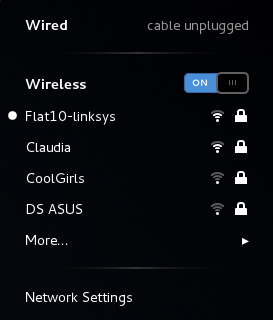
There are two prime forms of Community connection which you could charge by technique of your Mac, and which are frequent on the majority modern computer systems, a plug-in connection utilizing the Ethernet port, or a wireless, or WiFi connection utilizing the Airport Card. Networking choices are controlled by the Community element of Style Preferences. You will discover it on the third row, simply click on on the icon toward see the choices meant for your wired and wireless networks.

To join to a wired network you merely plug in the ethernet cable, which can normally be coming from either a modem or a router, into the port in your computer. While you're linked toward a wired network your Ethernet port will present as being connected within Means Preferences, and the dot might be green, relatively than red.

To connect to a wi-fi network you need to flip your Airport Card on. To do this you'll be able to select 'Flip Airport On' in both the Networking section of Style Preferences, or within the drop down menu that seems while you click the Airport icon on the greatest navigation bar. The Airport icon seems like a pie formed wedge. As quickly as you possess turned the Airport card on it is going to search designed for available wi-fi networks, and robotically ask you as long as you want to join one. Toward be part of a community you select it from the checklist, and then enter a safekeeping password as lengthy as it's required. Within the Networking component you can tick the checkbox beside the choice 'Ask toward be part of newer networks'. This will be sure that within the absence of a most popular network the computer will supply you different wireless networks which are in variety that you simply receive not linked to before.

You'll be able to construct up an inventory of most popular wi-fi networks and store the passwords for these networks so that you don't need to kind it in each time you wish toward join toward the network. Once you're entering the password meant for a new community simply tick the checkbox that says Save Password, and you will not be requested for this password again. Under the High quality tab of your Airport card in Mode Preferences you can see a list of all of the networks that you just own saved, and remove them as lengthy as necessary. You may as well drag the networks up and down to craft a preferred list. That is particularly useful if you possess multiple wireless network in your house, workplace, or favorite coffee shop, and also you need the pc to connect toward the one which normally contains a stronger sign, or which has a printer linked to it. As long as this network appears above all other nearby networks in the record your computer will connect to it by default.

One last option that you simply possess in working by mode of networks in your Mac is a location setting. With default your Location setting is Automatic. You can importance Location settings to specify which network you'd like to join, enter any password or settings that the network requires, and switch off supplementary ports, like as the Airport card so lengthy as the Location is an workplace in which you only join with ethernet. Normally the Automatic choice is enough, in spite of this it is good toward bear in mind which you can setup many locations designed for home and workplace must you want toward.

All wireless cards or ports on your laptop, like as your Airport Card or Bluetooth adapter eat power. Toward save energy and prolong your battery life once utilizing a laptop you can flip off your Airport Card, Bluetooth adapter, and even dim your screen.
Read Post | comments

OS X Mountain Lion sold 2 million copies just in time 48 Hours

Sunday, July 29, 2012

Apple's latest operating system, OS x 10.8 Mountain Lion obtain a positive response from the community. This is apparent in a very high level of sales. Imagine, in just over 48 hours after launch, the Mountain Lion has been used by more than 2 million people.

OS X Mountain Lion sold 2 million copies just in time 48 Hours

The price offered by Apple to download the latest operating system is not very expensive. You only need to spend money of 19.99 USD for a single OS to use it. In addition, the OS is also offered free of charge for consumers who purchase the Mac after June 11, 2012.

Level of sales of 2 million copies that it is not an official statement from Apple, but from Chitika which is a data analysis company.

This operating system is equipped with several new features. Among these are the Reminder, iMessage and Notification Center. Not only sold more than 2 million copies, Chitika also noted that the OS X Mountain Lion contributing to the increase in traffic of 3.2 percent in Apple Mac sites.

Chitika estimates, with the data that they find it and if 90 percent of Mac users do upgrade, then at least Apple earned revenues of $ 38 million USD in just 48 hours.
Read Post | comments
 
© Copyright Search Technologies 2012 - Some rights reserved | Powered by Recly Pitunov.